
Lowering The Barrier To Entry For Testing On Linux / Mono With Vagrant

Introduction

We are big fans of Mono on the Nancy project – we have Continuous Integration builds that run on both Mono 2.x, and Mono 3.x (in addition to Microsoft’s .net), and we have TravisCI also performing Mono builds of all pull requests as they come in.

As good as Mono is though, there are still times where we have issues with compatibility. Sometimes these are down to Mono itself, other times it’s a casing issue when running on Linux (which generally has a case sensitive file system, so /Images isn’t the same as /images). Plenty of our contributors are au fait with Mono and Linux, so fixing issues on pull requests isn’t an issue, but for those that aren’t, getting Mono and Linux set, even in a virtual environment can be daunting – and that’s before you even attempt to edit any files!

Introducing Nancy.Vagrant

I’ve discussed Vagrant in a previous post – it’s an excellent tool for automatically spinning up and configuring virtual machines, and we’ve used it to create two scripts that make creating a Linux/Mono test environment for Nancy as simple as typing:

vagrant up
vagrant ssh

And because Vagrant is capable of sharing folders between the host machine and the virtual machine, you can continue to edit the files in Visual Studio (or whatever editor of choice you use locally), and run the build in the Linux / Mono environment. Once you’re all done you can either stop the virtual machine, or delete it completely, using another single command.

Trying It Out

The scripts themselves, as well as instructions on getting up and running and some simple Linux help, can be found over on the Github repository:

https://github.com/NancyFx/Nancy.Vagrant

We hope this helps people get up and running easily with Linux and Mono, whether they’re contributing to Nancy or not.
Windows 8, Hyper-V, VirtualBox, Vagrant and Hanging on Boot

 Introduction

I’ve recently been playing around with Vagrant to allow Nancy contributors to easily test their changes on Mono, even if they don’t have much (or any) experience with Linux or Mono itself (more on this soon). Vagrant allows scripts to be created to quickly and easily spin up virtuals with a certain configuration, and just as easily tear them down and destroy them when you’re done (which is just as important if you’re using a machine with limited SSD space).

Vagrant sits on top of actual Virtualisation software such as VirtualBox or VMWare (but no Hyper-V support), but it defaults to VirtualBox, and that’s the only provider out there that doesn’t involve spending money as both VMWare, and the Vagrant plugin for it, are commercial.

The Problem

Vagrant installed fine, VirtualBox installed fine, everything appeared to be working and could spin up VMs just dandy, but when I rebooted the machine I was stuck with the “spinning dots of doom”, and the only way to get the computer back was restoring from system restore and ditching VirtualBox 🙁

I tried 3 different machines, two failed the same way and the third worked fine; the only difference being the working machine didn’t have Hyper-V enabled in Win8, but I couldn’t remove it from the other two as it’s required for Windows Phone 8 development, and I use it for several other virtuals as the performance is excellent. Stuck between a rock and a hard place 🙁

The Solution

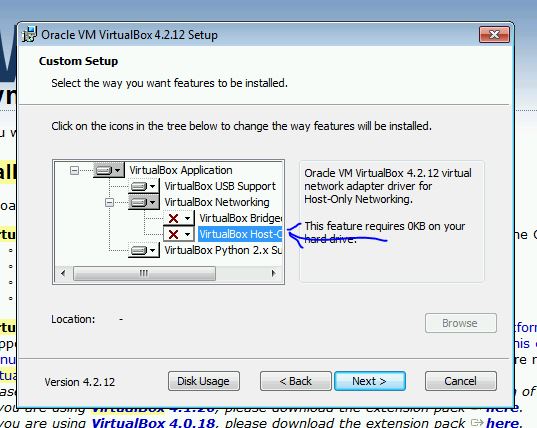
After trying multiple old versions of VirtualBox, and blind alleys that suggested disabling the hypervisor on startup would fix it (it didn’t), I finally tracked down the problem to be the networking drivers it installs. VirtualBox has three networking modes: NAT (the default), Bridged and HostOnly – with the latter two requiring separate drivers. Unchecking both sets of drivers in the installer and everything works fine:

VirtualBox


Vagrant uses NAT by default anyway, and that gives you internet access from the VMs, so there shouldn’t be too many situations where you need to use the other two options anyway. It even works side-by-side with Hyper-V too, so I can have my normal Hyper-V virtuals running while firing up Vagrant scripts on VirtualBox. It’s obviously a bit slower this way, as it can’t use it’s own HyperVisor, but it seems fast enough, and less hassle than having to disable Hyper-V and reboot every time I wanted to use Vagrant (or vice versa when I wanted to use Hyper-V).

Now, back to those Nancy scripts..