subscribe
Introduction
I mentioned this on Twitter last week, but completely failed to find it again today, so thought it was worth blogging for future reference 
As I have blogged about in the past, the Add Reference dialog in Visual Studio is still pretty terrible in VS2010. Various extensions have made it more bearable by providing search support and other enhancements, but now you can avoid it completely (most of the time) with an excellent extension from Clarius Consulting:
http://visualstudiogallery.msdn.microsoft.com/en-us/dc06b54c-b6c4-4cf5-8203-a09c6979e881
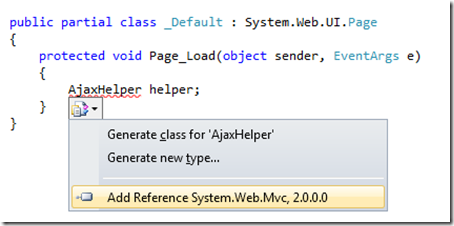
Anyone that’s used ReSharper will instantly recognise the approach – just hit Ctrl+. for the VS2010 Smart Tag on something you don’t currently have referenced, and voila – an option to automatically add the reference and the corresponding using statement:
Simple and effective – I haven’t had any problems with it since I installed it last week – go and give it a whirl